A WooCommerce product configurator that shows customers the price as they choose
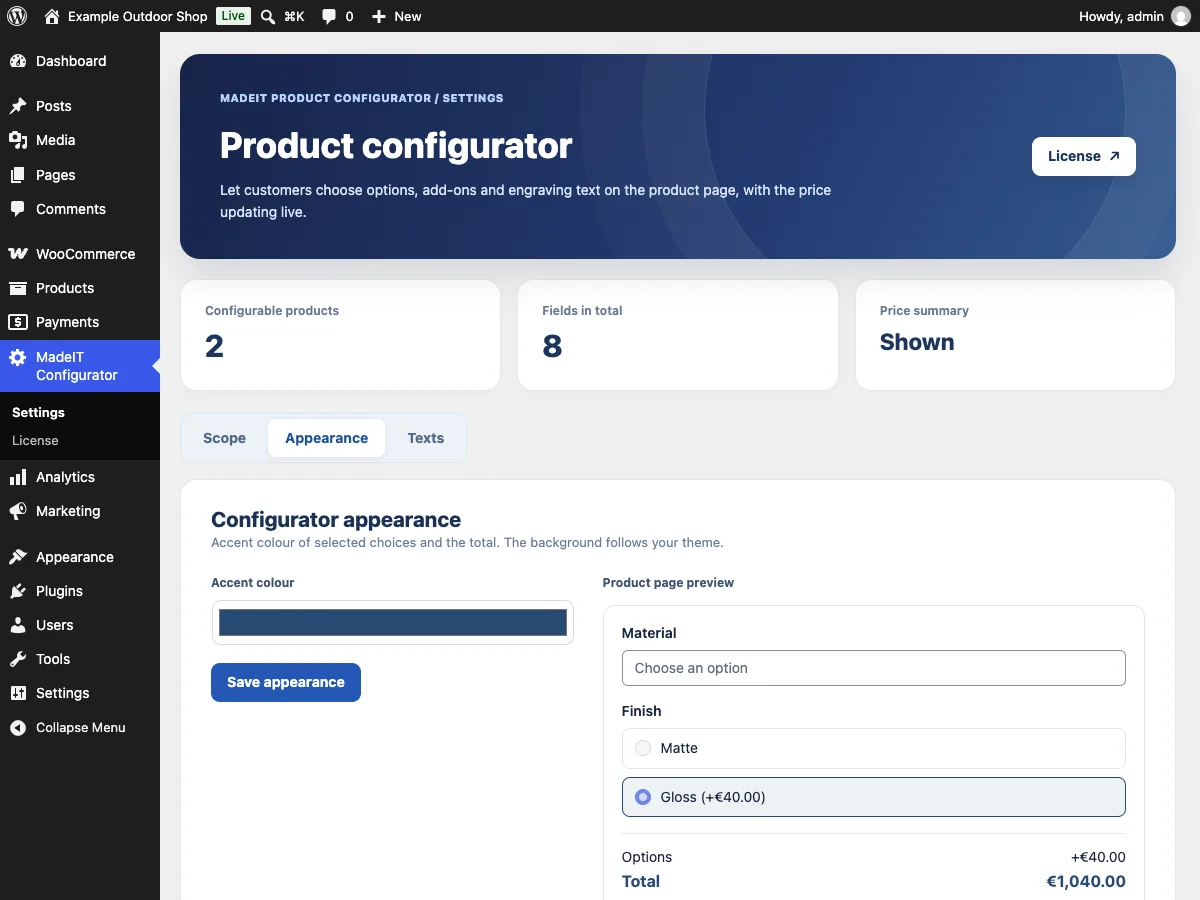
The free MadeIT Product Configurator lets customers pick options, add-ons and custom text with surcharges. The Pro add-on makes it match your shop: an accent colour, your own texts and a live preview in the admin.
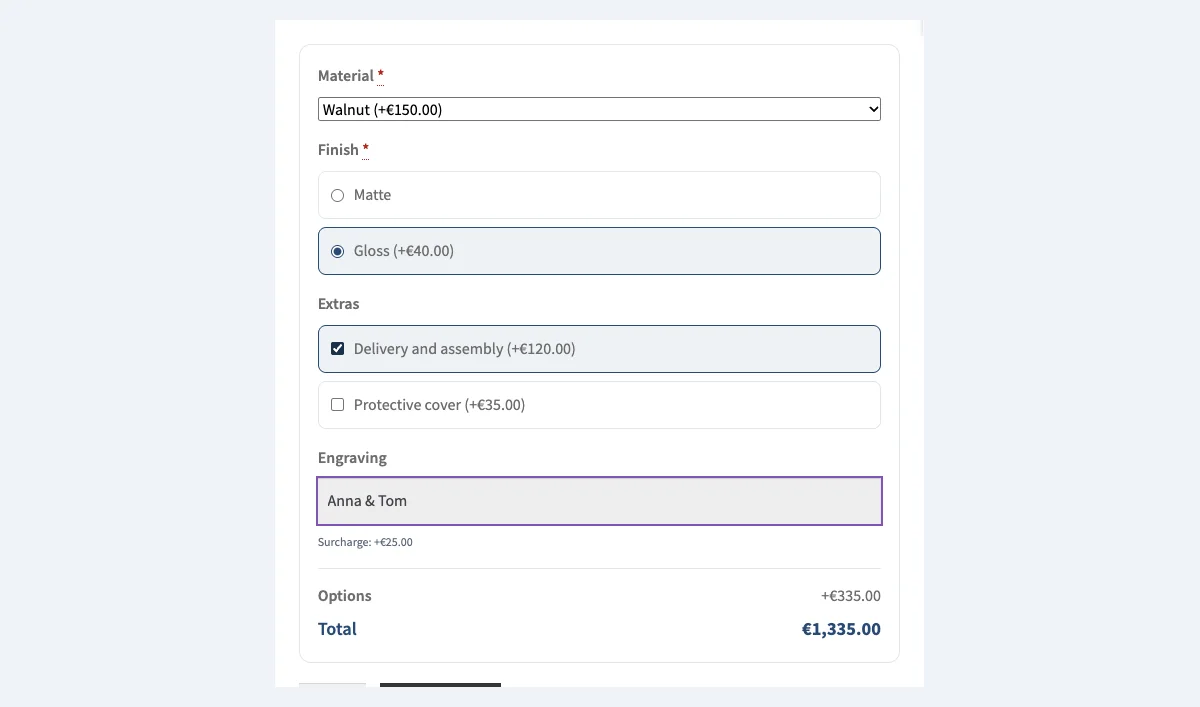
The free MadeIT Product Configurator plugin from WordPress.org adds fields to a product: a dropdown, single and multiple choice and a text input, for example for engraving. Every option can carry a fixed surcharge or a percent of the product price, and the customer sees the total before adding the product to the cart. It is complete on its own, with no trial and no locked features.
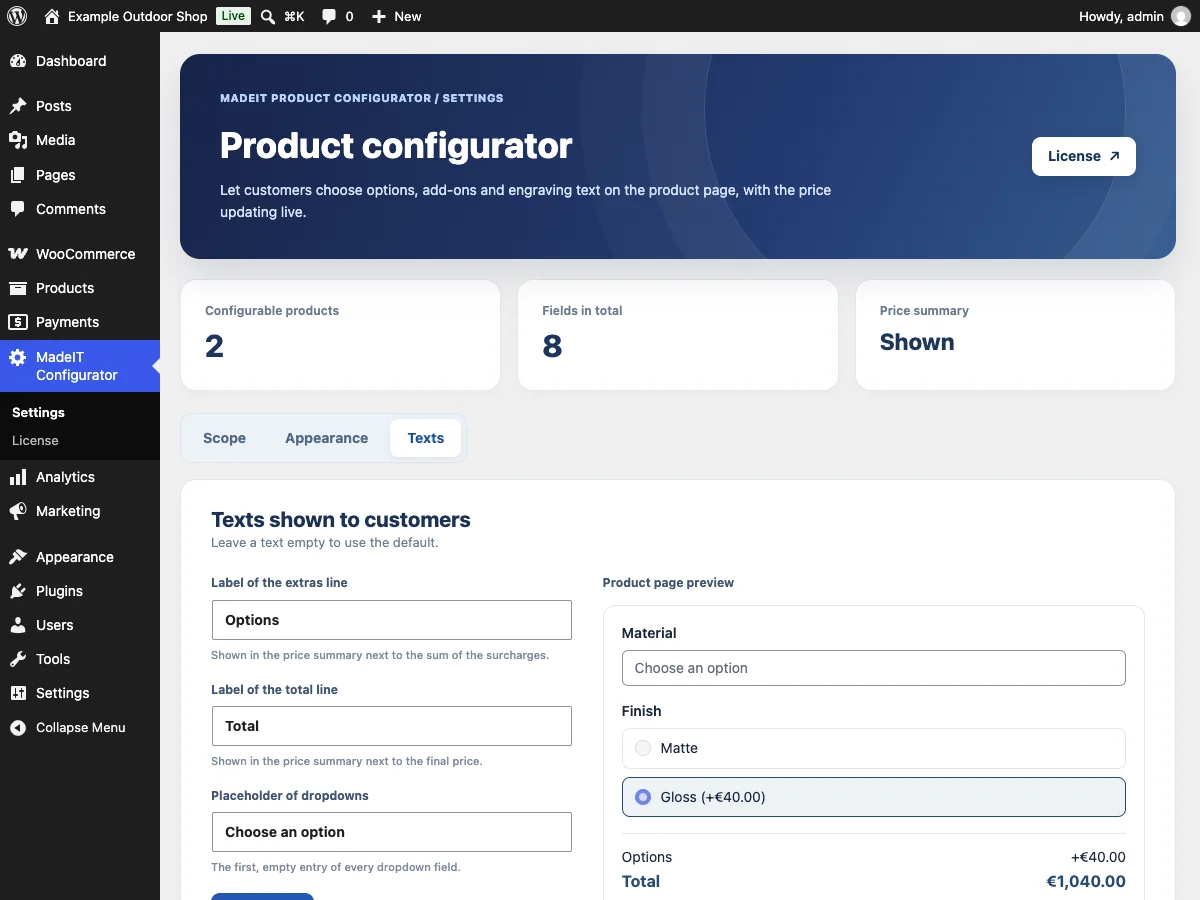
Pro is a separate add-on that you install next to it. It plugs into the free plugin through public hooks and adds Appearance and Texts tabs with a live preview, so the configurator looks and sounds like the rest of your shop.
MadeIT Product Configurator Pro in action
What you get with MadeIT Product Configurator Pro
Four field types (free plugin)
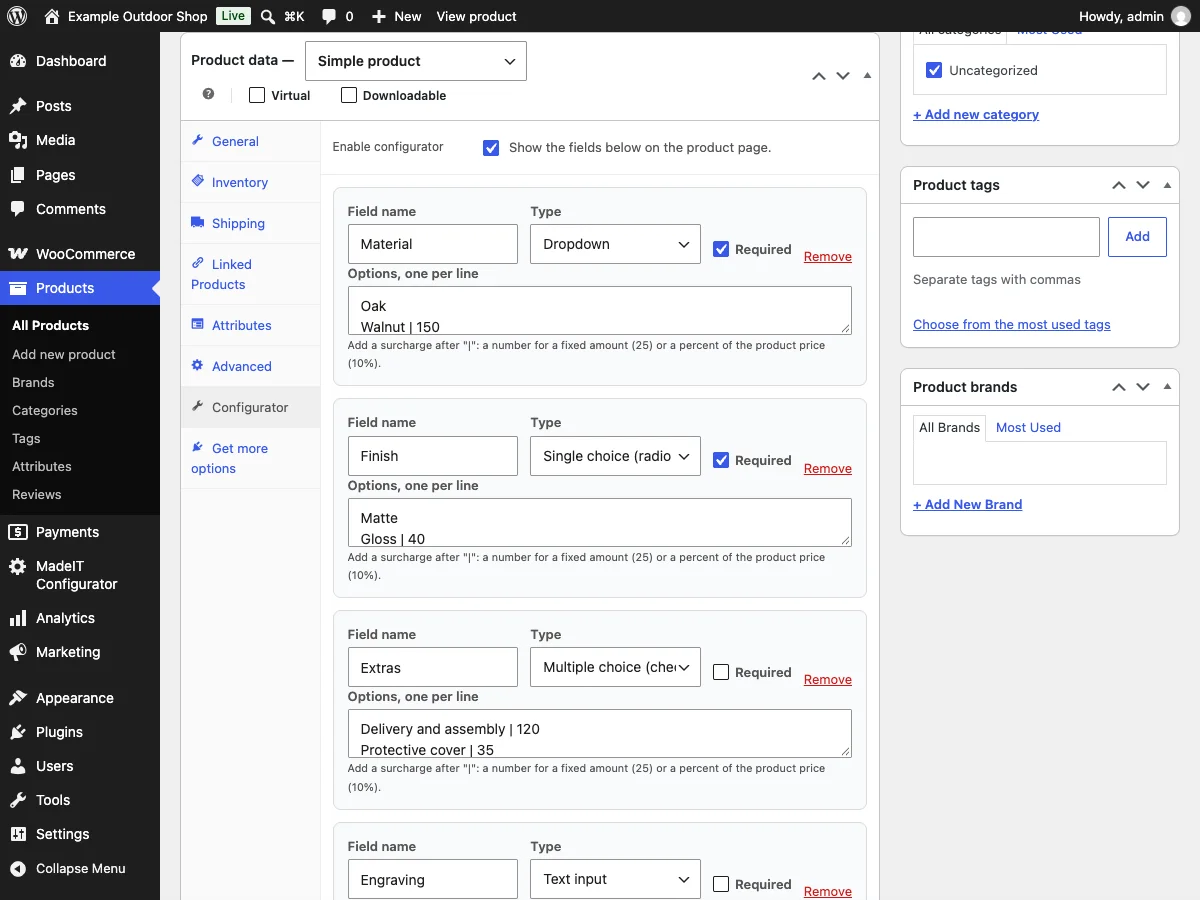
Dropdown, single choice, multiple choice and a text input. You set the fields per product, in the Configurator tab.
Surcharges (free plugin)
Write "Walnut | 150" for a fixed amount or "Ash | 10%" for a percent of the product price. A text field can add a surcharge when the customer fills it in.
Live price (free plugin)
Under the options the customer sees the extras and the final price, also after choosing a variation of a variable product.
Options in the order (free plugin)
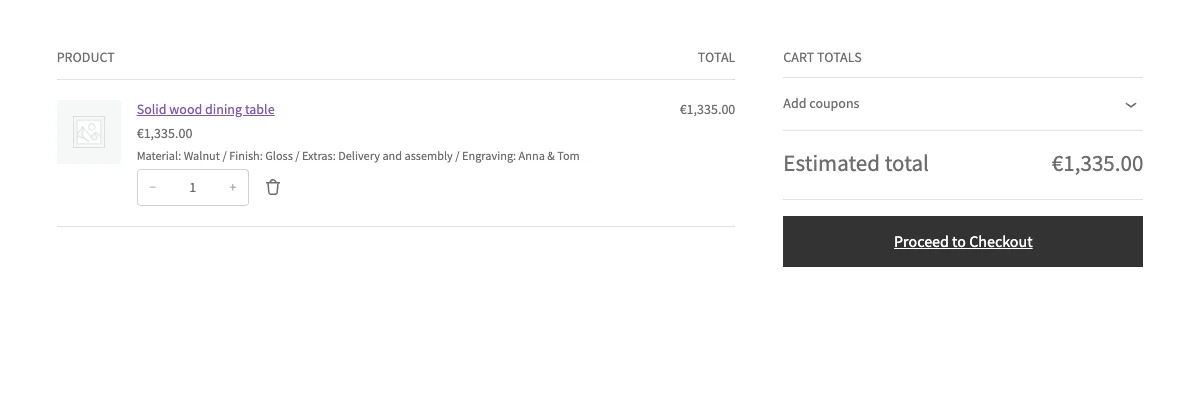
The choice shows in the cart, in the order summary and in the admin, and the surcharge is part of the line price.
Accent colour (Pro)
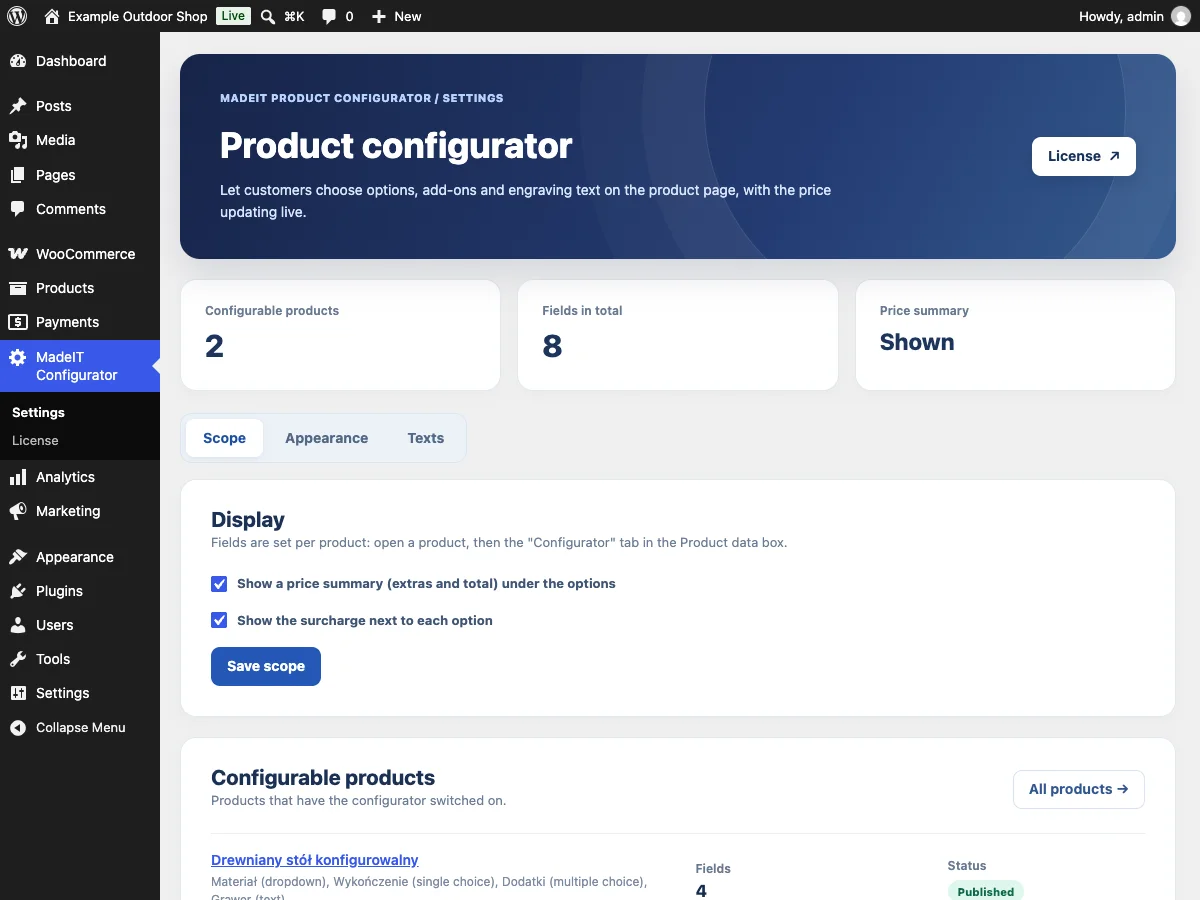
Pick the colour of the selected options and the total so it matches your theme. You see the change in the preview at once.
Your own texts (Pro)
Change the "Options" and "Total" labels and the dropdown placeholder. An empty text falls back to the default.
Live preview (Pro)
The Appearance and Texts tabs show a product page preview before you save.
What you get in the free plugin and in Pro
| Feature | MadeIT Product Configurator (free) | MadeIT Product Configurator Pro |
|---|---|---|
| Configurator | ||
| Fields: dropdown, single choice, multiple choice and text | Yes | Yes |
| Fixed and percentage surcharges, and a surcharge for a filled-in text field | Yes | Yes |
| Required fields, checked in the browser and on the server | Yes | Yes |
| Live price summary, also for variable products | Yes | Yes |
| Chosen options in the cart, at checkout and in the order, with the surcharge in the line price | Yes | Yes |
| Classic and block cart and checkout, HPOS compatible | Yes | Yes |
| A product with a configurator opens its page instead of being added from the shop archive | Yes | Yes |
| Appearance and texts | ||
| Accent colour of the selected options and the total | No | Yes |
| Your own texts: summary labels and the dropdown placeholder | No | Yes |
| Live product page preview in the admin | No | Yes |
| Updates and support | ||
| Updates | From WordPress.org | In the WordPress admin for 12 months, then on request |
| Support | WordPress.org support forum | Requests handled by the authors |
From installation to working in three steps
- 1
Install the free plugin
Install MadeIT Product Configurator from WordPress.org and activate it next to WooCommerce.
- 2
Configure a product
Open a product, choose the Configurator tab in the Product data box, switch it on and add fields with options and surcharges.
- 3
Add MadeIT Product Configurator Pro
Upload the add-on ZIP from your customer account, activate it and paste the license key on the License screen. Then set the colour and texts.
Use cases
- Shops selling made-to-measure or personalised products: furniture, jewellery, clothing, engraved gifts.
- Shops that sell add-ons to a product, such as assembly, a cover or gift wrapping.
- Shops whose prices depend on a material or finish and want to show that to the customer before the cart.
- Agencies that match the look of the configurator to a client theme without writing CSS.
What you need
- The free MadeIT Product Configurator plugin from WordPress.org, installed and active
- WooCommerce, with the classic or the block cart and checkout
- WordPress 6.6 or newer and PHP 8.0 or newer
FAQ: MadeIT Product Configurator Pro
Do I also need the free plugin?
Yes. MadeIT Product Configurator Pro is an add-on and needs the free MadeIT Product Configurator plugin from WordPress.org installed and active.
Is anything in the free plugin locked until I buy Pro?
No. The free plugin is complete: fields, surcharges, the live price, required fields and the options in the order. Pro adds the accent colour, your own texts and a live preview.
How do I write a surcharge for an option?
One option per line, with the surcharge after a vertical bar: "Walnut | 150" adds 150 in the shop currency, "Ash | 10%" adds 10% of the product price.
Are surcharges net or gross?
Like the product price: the way your shop stores prices. On the product page they are shown the way your shop displays prices, with or without tax.
Does it work with variable products?
Yes. The summary appears once a variation is chosen, and percentages are counted from the variation price.
Does it work with the block cart and checkout?
Yes. The chosen options and the price with surcharges show in the classic and the block cart and checkout, and are saved on the line item of the order.
What happens to the configurator when I deactivate Pro?
Nothing is lost. The configurator keeps working with the default colour and texts. Only the Appearance and Texts tabs disappear.
What happens when the license expires?
The installed version keeps working without limits. Only new versions and support are paused until you renew.
How many sites can one license be used on?
One license covers one site. You can detach a site in the customer account and activate the license elsewhere.
Does the add-on send customer data to MadeIT Labs?
No. Only the license key and the site address are sent to MadeIT Labs, to check the license.
Ready to try MadeIT Product Configurator Pro?
License, updates and documentation in one customer account. Support from the authors.