Run the request and complaint procedure of your public website in one place
MadeIT Accessibility prepares the accessibility statement for free. The Pro add-on adds the other half of the obligation: a public form for requests and complaints, reply deadlines that are tracked for you, and an accessibility toolbar for visitors.
The free MadeIT Accessibility plugin from WordPress.org builds the accessibility statement from a short form, checks that it is complete, warns when the yearly review is overdue and adds a skip link and a footer link. It is complete on its own, with no trial and no locked features.
Pro is a separate add-on that you install next to it. It plugs into the free plugin through public hooks and adds what a public body has to handle in practice: reports from visitors with a 7-day reply deadline (extendable to 2 months), reminders about deadlines, and a toolbar that lets visitors adjust text size, contrast and spacing.
MadeIT Accessibility Pro in action
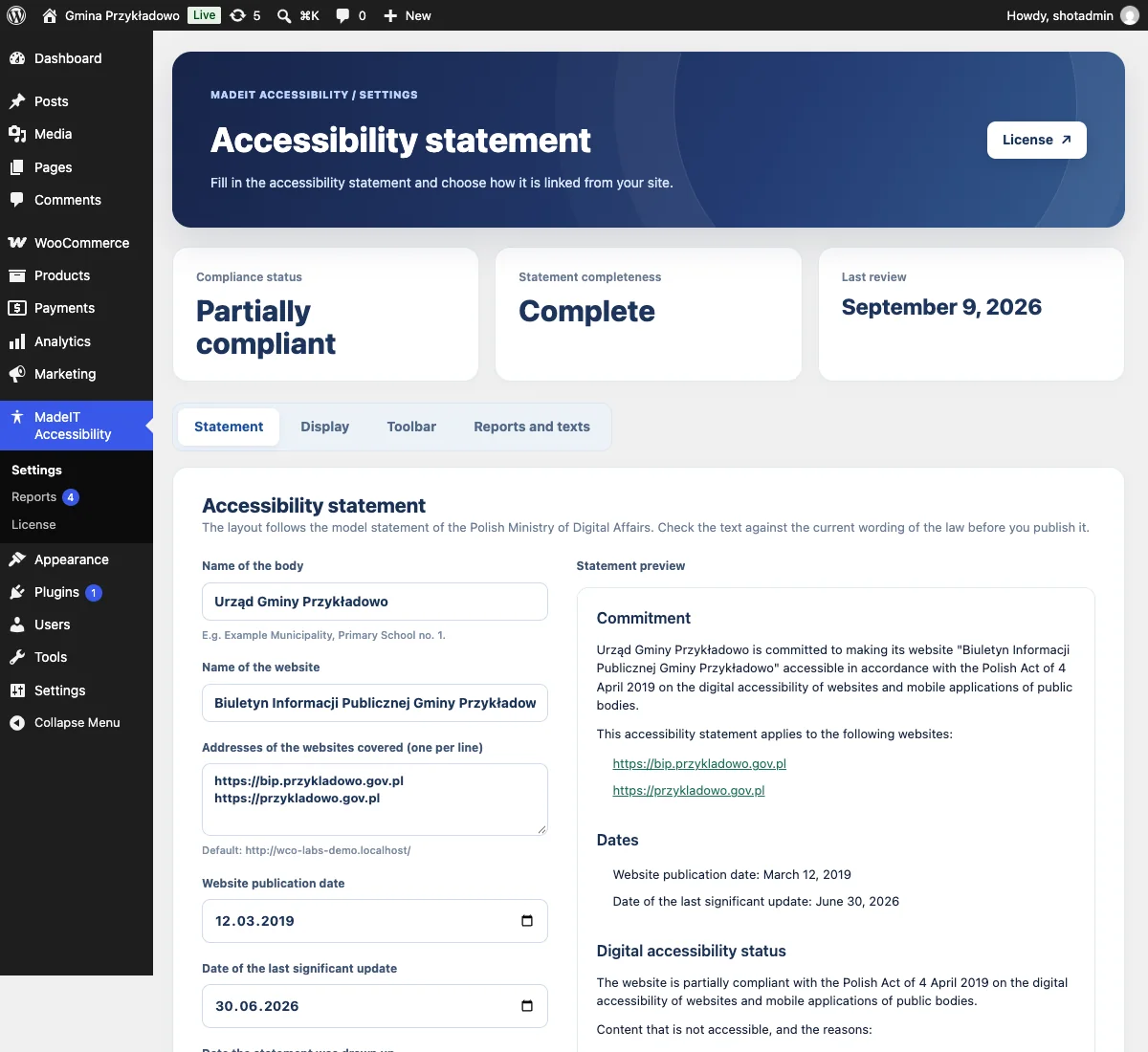
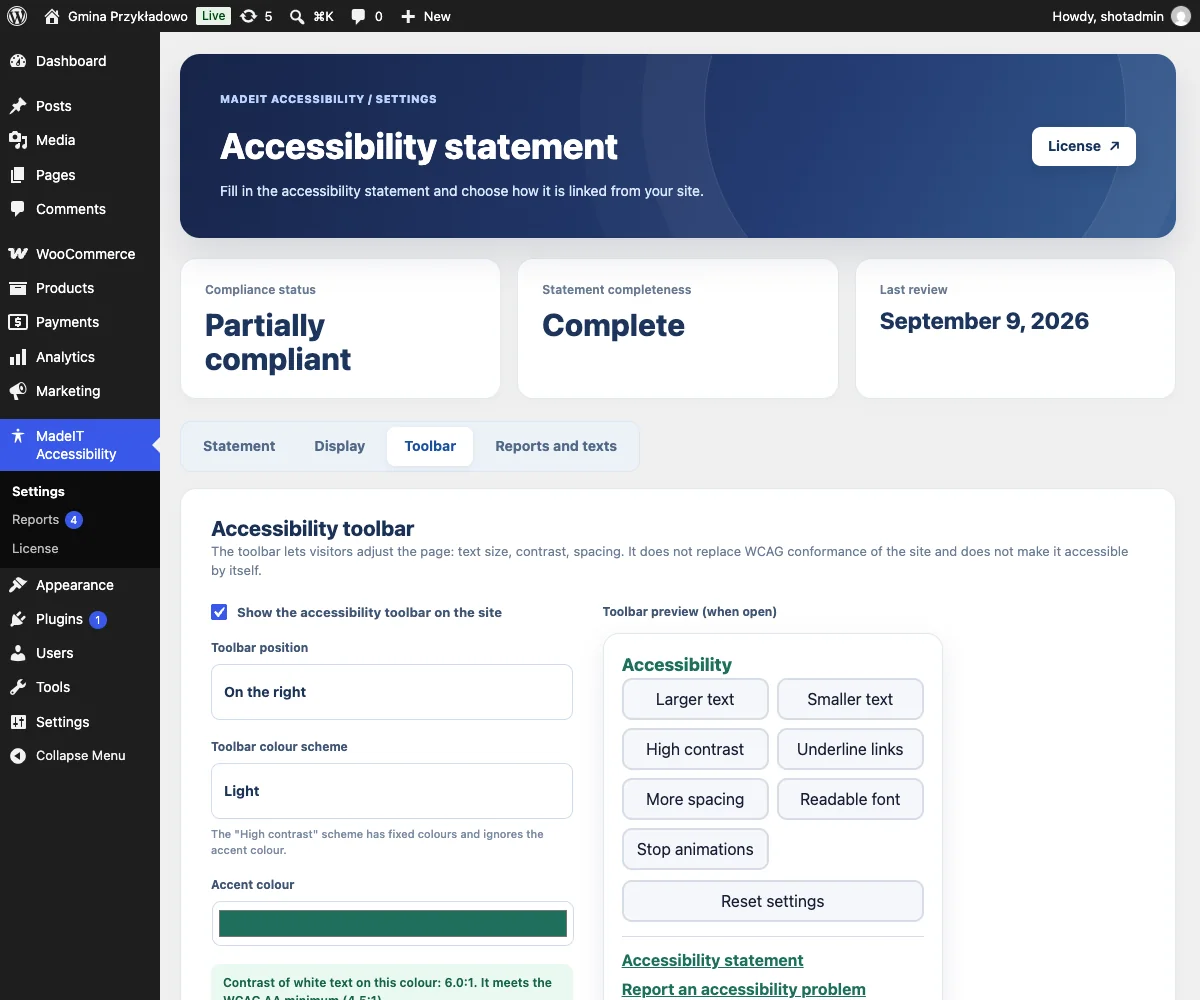
What you get with MadeIT Accessibility Pro
Statement generator (free plugin)
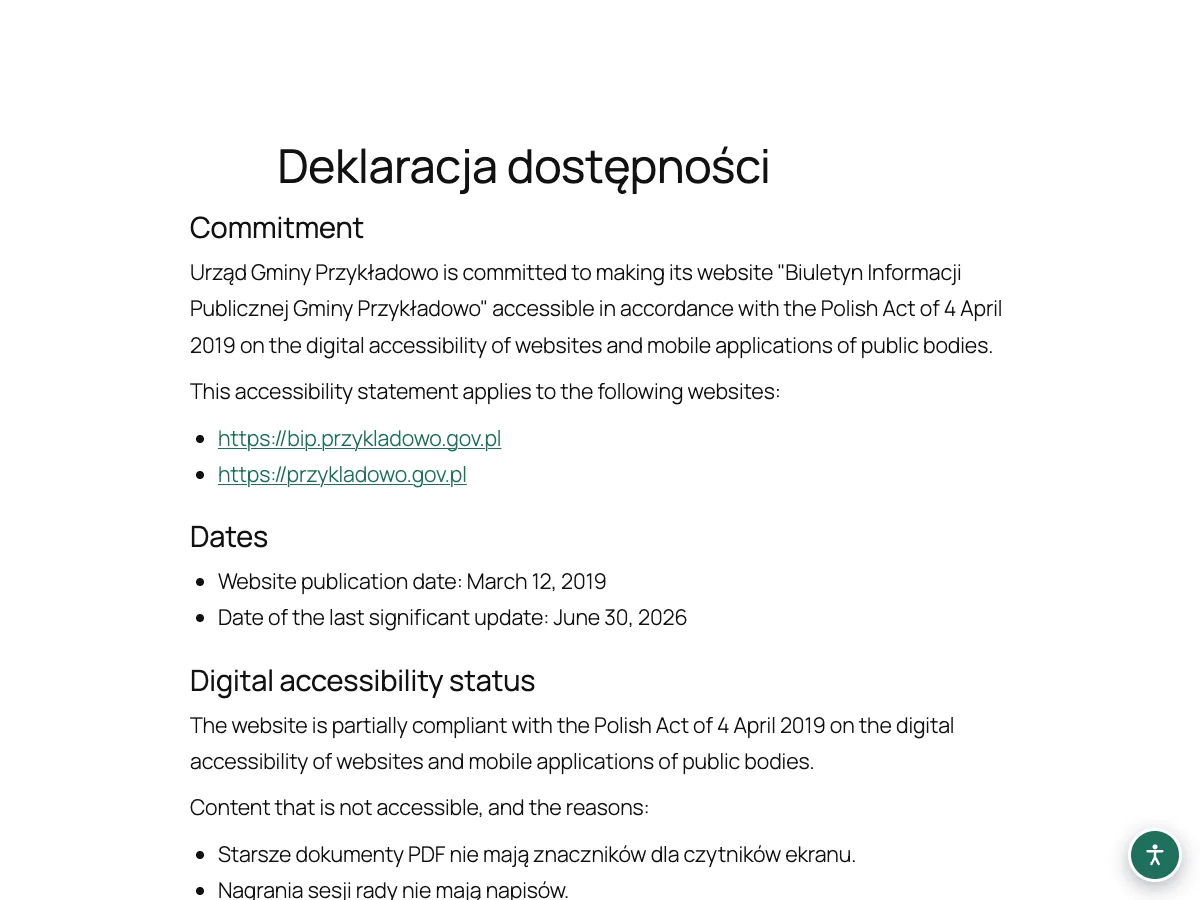
The statement is built from a short form following the model statement, with a completeness check and a live preview.
Request and complaint form (Pro)
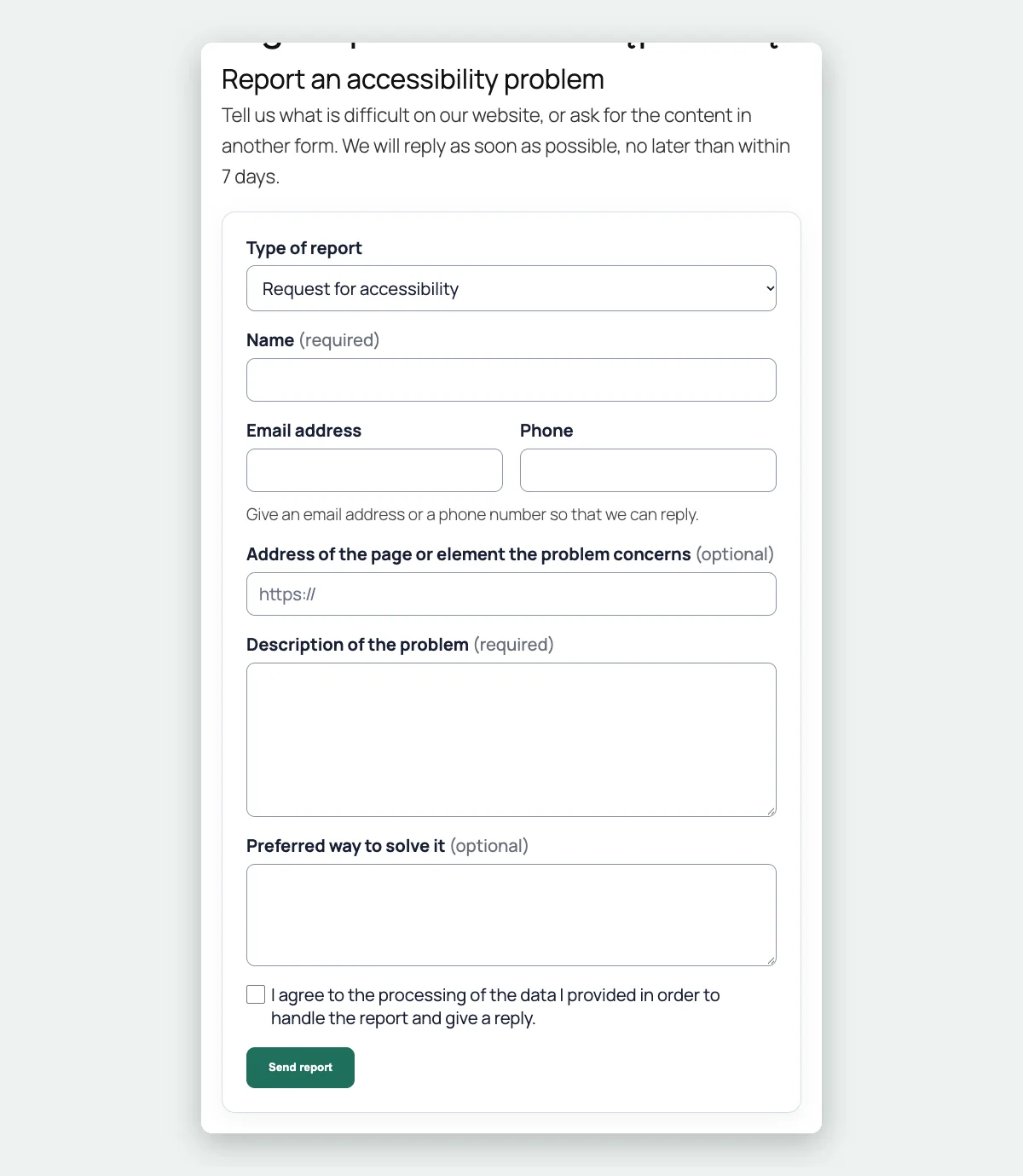
A public form for requests, complaints and problem reports, with consent, a honeypot field and a rate limit, available through a shortcode.
Reply deadlines (Pro)
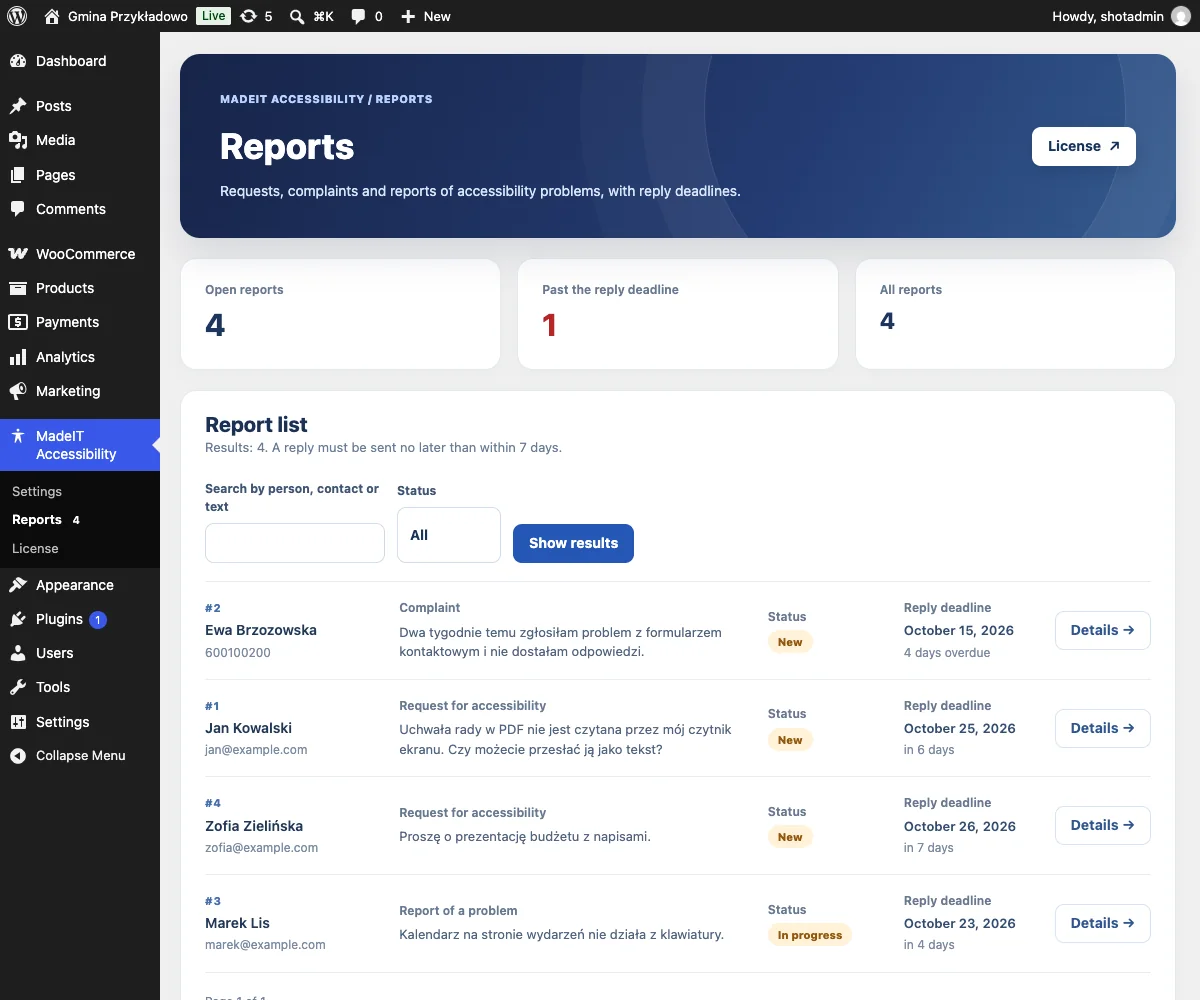
Every report gets a 7-day deadline that you can extend up to 2 months, with a status, an internal note and an email to the person about the new date.
Deadline reminders (Pro)
Once a day the coordinator gets one email about reports that are due within a day or already late.
Accessibility toolbar (Pro)
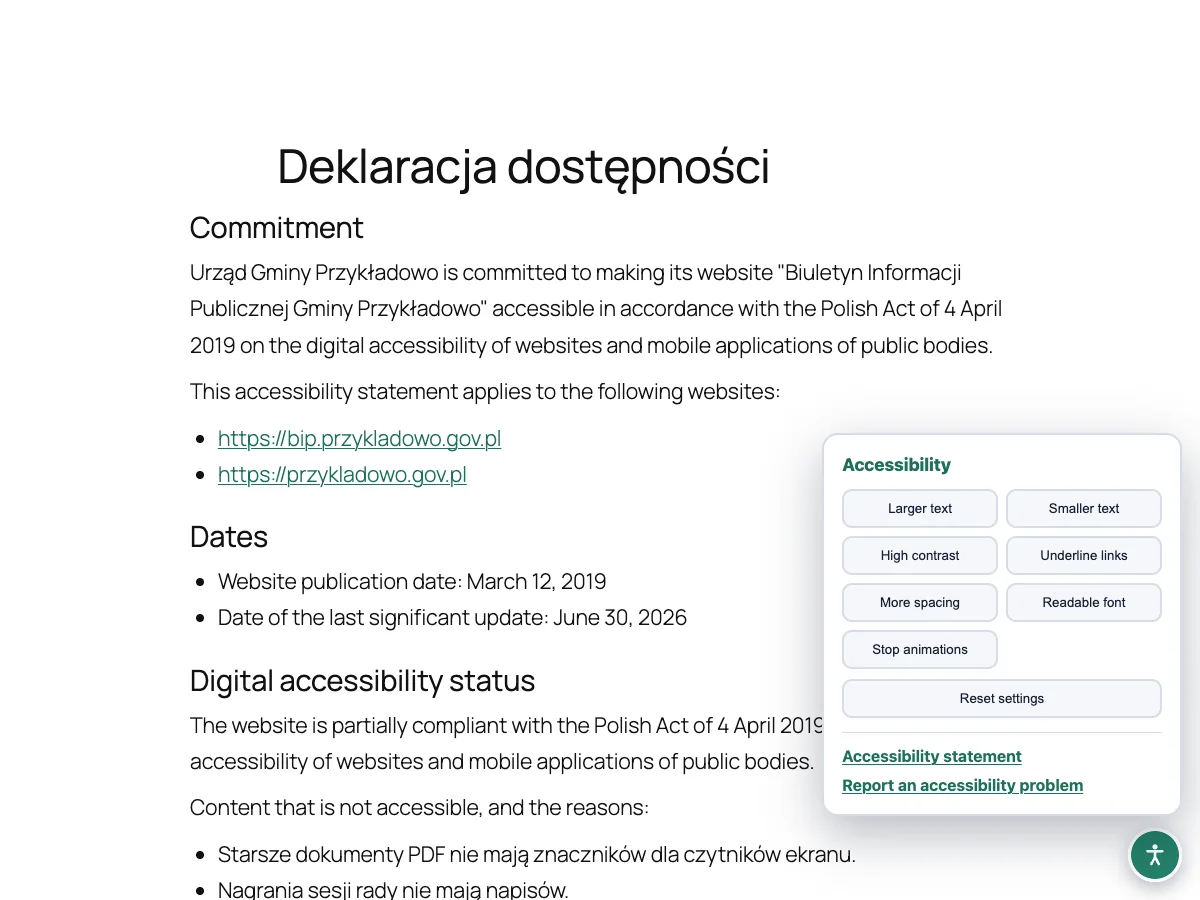
Visitors can enlarge the text, switch to high contrast, underline links, add spacing, use a readable font and stop animations. Their choices are remembered in the browser.
Colour schemes with a contrast check (Pro)
Light, dark and high contrast schemes, and a check that warns when white text on your accent colour falls below the WCAG AA contrast.
Editable texts (Pro)
Edit the form title and introduction, the thank-you message, the consent and the name of the toolbar.
Skip link and footer link (free plugin)
A "Skip to content" link and a link to the statement in the footer, both optional.
What you get in the free plugin and in Pro
| Feature | MadeIT Accessibility (free) | MadeIT Accessibility Pro |
|---|---|---|
| Accessibility statement | ||
| Statement generator based on the model statement, with a live preview | Yes | Yes |
| Completeness check and a warning when the yearly review is overdue | Yes | Yes |
| Statement page created on activation and a shortcode | Yes | Yes |
| Skip link and a footer link to the statement | Yes | Yes |
| Requests and complaints | ||
| Public form for requests, complaints and problem reports | No | Yes |
| Reply deadline of 7 days, extendable to 2 months, with status and notes | No | Yes |
| Email notifications and a daily reminder about approaching deadlines | No | Yes |
| Link from the statement to the form | No | Yes |
| Toolbar and look | ||
| Accessibility toolbar: text size, contrast, link underline, spacing, readable font, stop animations | No | Yes |
| Colour schemes (light, dark, high contrast) with a WCAG contrast check | No | Yes |
| Editable form, consent and toolbar texts | No | Yes |
| Updates and support | ||
| Updates | From WordPress.org | In the WordPress dashboard for 12 months, after that on request |
| Support | WordPress.org support forum | Support tickets answered by the authors |
From installation to working in three steps
- 1
Install the free plugin
Install MadeIT Accessibility from WordPress.org and fill in your accessibility statement.
- 2
Add MadeIT Accessibility Pro
Upload the Pro ZIP from your customer account, activate it and paste your license key on the License screen.
- 3
Open the report channel
Check the report form page that is created on activation, choose the toolbar scheme and handle reports under Reports.
Use cases
- Municipalities, schools, libraries and other public bodies that must publish an accessibility statement.
- Coordinators who need a record of requests and complaints and their reply deadlines.
- Sites that want to give visitors simple controls for text size and contrast.
- Organisations that want to show a clear procedure and keep an audit trail of every report.
What you need
- The free MadeIT Accessibility plugin from WordPress.org, installed and active
- WordPress 6.6 or newer and PHP 8.0 or newer
- Working outgoing email and WP-Cron for notifications and reminders
FAQ: MadeIT Accessibility Pro
Do I need the free plugin as well?
Yes. MadeIT Accessibility Pro is an add-on and needs the free MadeIT Accessibility plugin from WordPress.org to be installed and active. The free plugin produces the statement.
Is anything in the free plugin locked until I buy Pro?
No. The free plugin is complete: the statement generator, the completeness check, the review warning, the skip link and the footer link. Pro adds the report form with deadlines, the toolbar, colour schemes and editable texts.
Does the toolbar make my website accessible?
No. The toolbar helps visitors adjust the page, but it does not replace conformance with WCAG. The accessibility of your theme, content and documents still has to be fixed at the source.
What are the reply deadlines based on?
The plugin follows the Polish procedure: a reply without delay and no later than within 7 days, extendable to a date no later than 2 months from the request. Check the wording of the law that applies to you.
Is the plugin only for Polish public bodies?
The statement structure follows the Polish model statement that implements the EU Web Accessibility Directive, so it fits Polish bodies best. The texts are translatable.
What happens if I deactivate Pro?
The statement, the skip link and the footer link keep working. The report form, the toolbar and the deadline reminders stop, and the reports stay in the database for when you reactivate Pro.
What happens when the license expires?
The installed version keeps working without limits. Only new versions and support are paused until you renew.
How many sites can I use one license on?
One license covers one site. You can detach the site in your customer account and activate the license somewhere else.
Documentation: MadeIT Accessibility Pro
Every feature of the free plugin and of the Pro add-on is described step by step.
Open the documentation →Ready to try MadeIT Accessibility Pro?
License, updates and documentation in one customer account. Support from the authors.